Software Name:
Artensoft Photo Collage Maker
Version: 1.2
Category: Miscellaneous
Date Listed/Updated: 2022-07-14 16:18:37
File size: 5384 KB
OS: WinXP,WinVista,WinVista x64,Win7 x32,Win7 x64,Win2000,WinOther,WinServer
License: Other Price($): 79.95
Author/Publisher name: Artensoft Company
View Full Screenshot
Description: Creating a photographic masterpiece is simple. With Artensoft Photo Collage Maker, you can turn any image into a great photo collage. Using multiple pictures to compose a single master image, Artensoft Photo Collage Maker is a great tool for printing big size, super-detailed collages that can be viewed from afar and studied up close.
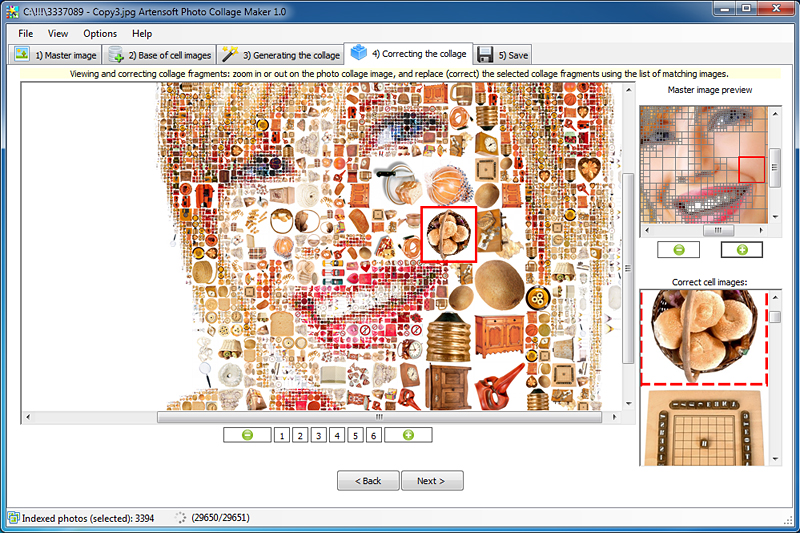
Producing a great photo collage could not be made simpler. There are five easy steps to follow. Choose your master image (that s what ll be seen from afar), select folders with images to be used as tiles, choose your settings and do any final adjustments if needed.
Artensoft Photo Collage Maker makes the most comprehensive collages. No color overlays or similar digital tricks are ever used. All photo collages created by Artensoft Photo Collage Maker are composed of small cell pictures fitted together to create a realistic and very detailed big picture. Artensoft Photo Collage Maker is perfect for printing big size, creating posters and photo wallpapers holding detail even when studied up close.
Artensoft Photo Collage Maker works completely stand-alone with no third party plug-ins or external editors required. You can go full auto or make numberless manual adjustments to produce an exclusive photo collage that looks great, every time.

 We have affiliation with number one software market place Share-IT\. Contact us for better pricing/customised coupon code
 Use Avangate Coupoun code 548AAC3EB7 to get maximum discount. Please contact through skype: softrevu or send mail to submit@softrevu.com for better pricing
EULA

Tags: photocollage collage photo collage maker photo collage photocollage maker
Is this software spam? Report Spam
Software removal request by publisher Removal Request
Software Review: Artensoft Photo Collage Maker Review
For publisher: Request Software Confirmation
Press release from the publisher:Artensoft Photo Collage Maker Generates collages a la Steve Jobs Mosaic Portrait
New computer program makes impressive photo collages in the style of a famous photo collage of Steve Jobs composed by Charis Tsevis from Apple icons, products and logos
Smolensk, Russia (December 14, 2010) Artensoft today announces Artensoft Photo Collage Maker 1.0, the first and only Windows application that can automatically generate high-resolution photographic collages in the manner of a collage portrait of Steve Jobs composed of small pictures of Apple s gadgets by famous designer Charis Tsevis. To create a photo collage, there is no need to have any knowledge of design and collage techniques.
A while back I saw an article in Forbes, which had a portrait of Steve Jobs made out of hundreds of tiny Apple icons and gadgets and decided to write a mathematical algorithm that could allow ordinary Windows users to create a photo collage like that automatically, says Eugene Baryshnikov, the program s chief developer, Artensoft. As a result, we have developed a unique technology that was derived from the analysis of the Steve Jobs photocollage. Now anyone with Windows PC can create an exclusive photocollage with a push of a button .
The program offers a wizard that makes it a matter of a few minutes to create a photo collage. The first thing is to choose a source photograph to make into a collage, and then add a collection of pictures that will be used as source material for the collage. For producing good results, it is recommended to have between 500 and 1500 images (picture sets are supplied with the program). Similar to a human artist, the program examines a source image and then recreates it as a hand-made collage automatically. The output can be saved to JPEG, BMP, TIFF or PNG.
Artensoft Photo Collage Maker gives a full range of options to produce a coherent collage. For example, the user can specify types of tiles to be used for generating a collage (mirrored images, 90 degree image rotation to the left or right, or 180 degree rotation). Besides, it is possible to set a radius for eliminating neighboring duplicate tiles, increase or decrease the number of large pictures, and select areas to be filled. When the first collage is generated, the user can manipulate a collage to individual preferences by resizing and replacing some tiles.
With Artensoft Photo Collage Maker, home users can create a one-of-a-kind collage portrait of relatives and friends and present it as a gift. The program can also be used by professional designers and advertisers, who can, for instance, create a mosaic ad banner from the products of a company or photos of happy employees.
Read more about the program at:
Visit the Press Release for more details
Software from the publisher:Artensoft Photo Mosaic Wizard, Artensoft Photo Collage Maker,
 Free YouTube Downloader Converter


