Software Name:
Flash Recovery Toolbox
Version: 1.1.17
Category: Miscellaneous
Date Listed/Updated: 2016-08-21 10:59:18
File size: 1245 KB
OS: WinXP,Windows2000,Windows2003,Windows Vista Ultimate,Windows Vista Ultimate x64,Win98,WinME,WinNT 4.
License: Other Price($): 27
Author/Publisher name: Recovery ToolBox
View Full Screenshot
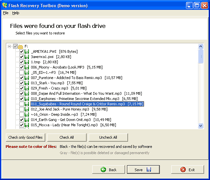
Description: Take a closer look at Flash Recovery Toolbox and make sure you may easily get your data back without additional explanations and data recovery services. This program is so easy to use that you may simply follow its guidelines and install the utility on any PC for flash drive recovery purposes. This application does not have compatibility issues so you may start recovering flash drives immediately after the occurrence of data corruption problems. Pay attention to the size of downloaded file, the installer of Flash Recovery Toolbox is really small so you may get it within several seconds despite possible traffic limitations in the local area network of your company. Click the installer of flash recovery tool as soon as you get it on your PC, install Flash Recovery Toolbox and start repairing usb drives, floppy disks, smart cards and other supported devices using the FAT file system. Look through the screenshots of flash memory repair process, the description of Flash Recovery Toolbox can be found on the website of application developer or simply follow the guidelines. It should not be too complicated even for inexperienced users, therefore there is no need for additional explanations. Click the shortcut of Flash Recovery Toolbox as soon as you install this application and go to the following stage of data recovery by selecting a flash drive to be processed. Now you may start the analysis of selected drive in FAT format by using the Next softkey, Flash Recovery Toolbox automatically moves to the following stage so you should be patient and wait for the end of flash drive restore. The analysis of selected drive depends on various factors, including the speed of CPU, the size of corrupted drive and the overall performance of selected PC. As soon as the processing of corrupted device is successfully completed, Flash Recovery Toolbox provides the list of successfully repaired documents that can be now saved to any other disk or removable media.

 We have affiliation with number one software market place Share-IT\. Contact us for better pricing/customised coupon code
 Use Avangate Coupoun code 548AAC3EB7 to get maximum discount. Please contact through skype: softrevu or send mail to submit@softrevu.com for better pricing
EULA

Tags: flashRecovery toolsboox foto Recovery club foto Recovery compact flash foto Recovery from pen dri
Is this software spam? Report Spam
Software removal request by publisher Removal Request
Software Review: Flash Recovery Toolbox Review
For publisher: Request Software Confirmation
Press release from the publisher:New version of Flash Recovery Toolbox released
Take a closer look at Flash Recovery Toolbox and make sure you may easily get your data back without additional explanations and data recovery services. This program is so easy to use that you may simply follow its guidelines and install the utility on any PC for flash drive recovery purposes. This application does not have compatibility issues so you may start recovering flash drives immediately after the occurrence of data corruption problems. Pay attention to the size of downloaded file, the installer of Flash Recovery Toolbox is really small so you may get it within several seconds despite possible traffic limitations in the local area network of your company. Click the installer of flash recovery tool as soon as you get it on your PC, install Flash Recovery Toolbox and start repairing usb drives, floppy disks, smart cards and other supported devices using the FAT file system. Look through the screenshots of flash memory repair process, the description of Flash Recovery Toolbox can be found on the website of application developer or simply follow the guidelines. It should not be too complicated even for inexperienced users, therefore there is no need for additional explanations. Click the shortcut of Flash Recovery Toolbox as soon as you install this application and go to the following stage of data recovery by selecting a flash drive to be processed. Now you may start the analysis of selected drive in FAT format by using the Next softkey, Flash Recovery Toolbox automatically moves to the following stage so you should be patient and wait for the end of flash drive restore. The analysis of selected drive depends on various factors, including the speed of CPU, the size of corrupted drive and the overall performance of selected PC. As soon as the processing of corrupted device is successfully completed, Flash Recovery Toolbox provides the list of successfully repaired documents that can be now saved to any other disk or removable media.
Read more: http://www.oemailrecovery.com/flash_recovery.html
Download link: http://www.oemailrecovery.com/downloads/FlashRecoveryToolboxSetup.exe
Visit the Press Release for more details
Software from the publisher:Address Book Recovery, DBF Recovery Toolbox, Flash Recovery Toolbox, OE-Mail Recovery, Password Recovery Toolbox for Outlook, PDF Recovery Toolbox, Password Recovery Toolbox for Outlook Express, Access Recovery Toolbox, CD Recovery Toolbox Free, Excel Recovery Toolbox, Exchange Server Recovery Toolbox, Photoshop Recovery Toolbox, RAR Recovery Toolbox, Word Recovery Toolbox, Zip Recovery Toolbox, Project Recovery Toolbox, Registry Recovery Toolbox,
 Free YouTube Downloader Converter


