Software Name:
Outlook Schedule Sending Automatic Email
Version: 4.2.8
Category: Business
Date Listed/Updated: 2010-05-05 14:21:46
File size: 556 KB
OS: WinXP,WinVista,WinVista x64,Win7 x32,Win7 x64,Win2000,Windows2000,Windows2003,Windows Vista Ultimate
License: freeware Price($): 29.95
Author/Publisher name: ACCM Software
View Full Screenshot
Description: Schedule Sending Automatic Email is a powerful and easy-to-use Microsoft Outlook Email Scheduler for automatically sending the recurring email message on schedule using Microsoft Office Outlook. The software can be used to send automatic email on schedule ( minutely, hourly, daily, weekly, monthly, yearly or a specified future date ). The software can be used to send an email message with the different attachments every time, even includes an entire folder. You can select an expiration date or expiration number of sending, if the system date later than the expiration date, or the number of the email has been sent is equal to the expiration number, the recurrences will be stopped.
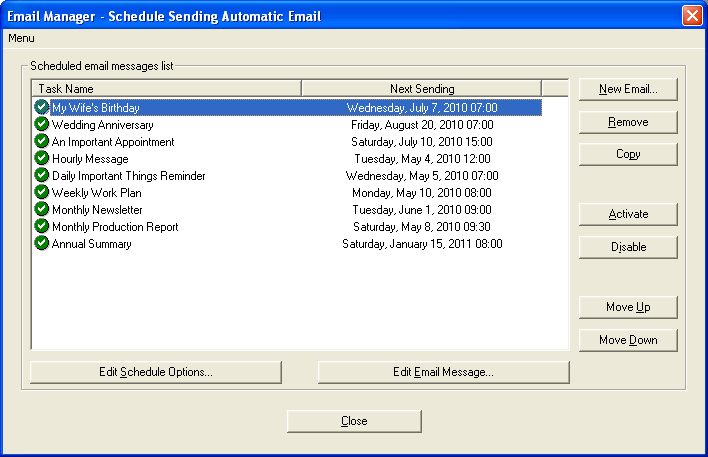
Our software has a powerful Email Manager. You can create, change, remove, copy, activate or disable the email message and schedule options anytime.
Recurrence options:
No recurrences - Only send the email one-time on the starting date without any recurrences.
Minutely - Send the email every N minutes. If the N is a multiple of 60, it's hourly.
Daily - Send the email every N days. Or, send the email every day, weekday, weekend day, even day or odd day.
Weekly - Send the email on some days of a week (optional) every N weeks. Or, send the email on some days of the first ( second, third, fourth or last ) week of every month.
Monthly - Send the email on the specified date of every N months. Or, send the email on the first ( second, third, fourth or last ) day ( weekday, weekend day, even day, odd day, Sunday, Monday, Tuesday, Wednesday, Thursday, Friday or Saturday ).
Yearly - Send the email on the specified date annually, for example, January 1 or December 25 every year. Or send the email on the first ( second, third, fourth or last ) day ( weekday, weekend day, even day, odd day, Sunday, Monday, Tuesday, Wednesday, Thursday, Friday or Saturday ) of January ( February, March, April, May, June, July, August, September, October, November or December ).

EULA

Tags: schedule email schedule outlook email schedule send email schedule sending email schedule automa
Is this software spam? Report Spam
Software removal request by publisher Removal Request
Software Review: Outlook Schedule Sending Automatic Email Review
For publisher: Request Software Confirmation
Software from the publisher:Outlook Schedule Sending Automatic Email, Remove All Duplicates for Outlook,
 Free YouTube Downloader Converter


