Software Name:
Hot Virtual Keyboard
Version: 5.1
Category: Utilities
Date Listed/Updated: 2010-05-25 14:23:29
File size: 3563 KB
OS: WinXP,WinVista,WinVista x64,Win7 x32,Win7 x64,Win2000,Windows2000,Windows2003,Windows Vista Ultimate
License: freeware Price($): 29.95
Author/Publisher name: Comfort Software Group
View Full Screenshot
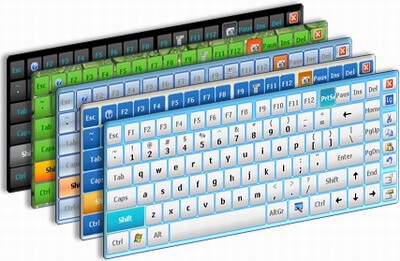
Description: Create your own virtual keyboard and type like a professional by using a mouse or touch screen! Hot Virtual Keyboard makes previous-generation on-screen keyboards look ancient. Type faster with configurable mouse gestures, launch programs, browse the Internet, and run programmable macros with any of the 56 keyboards included with Hot Virtual Keyboard. The new virtual on-screen keyboard employs advanced typing techniques used in modern mobile phones and communicators, including word auto-complete allowing you to choose the right word with a single click after entering just one or two letters.
Users of Tablet PC, UMPC, Panel PC, Car PC and similar touch-screen devices will find Hot Virtual Keyboard indispensable. Use a mouse, touchpad or fingers for on-screen typing. With Hot Virtual Keyboard, you can type faster and more conveniently than by using built-in Windows On-Screen Keyboard. Use gestures for quickly performing repeat operations such as shifting the case of the letters, specify applications to hide Hot Virtual Keyboard from, and set your own hotkeys to launch programs or Web sites, run macros, and perform operations such as copy and paste.
The new virtual onscreen keyboard replaces Windows built-in On-Screen Keyboard with a much more advanced alternative. It's just as useful and as compatible as the native application. Supporting all languages and all installed keyboard layouts, Hot Virtual Keyboard is a truly international tool. Supplying over 50 pre-defined keyboard skins, the virtual on-screen keyboard allows you to create, customize and configure a unique new keyboard to your personal liking. Adjust colors and gamma, assign unique sounds to groups of keys, set shape of the keys and choose your own background.
Using a virtual on-screen keyboard does not have to be a hassle. Try Hot Virtual Keyboard, and you'll never go back!

EULA

Tags: virtual keyboard screen keyboard kiosk touch pc monitor panel pc umpc
Is this software spam? Report Spam
Software removal request by publisher Removal Request
Software Review: Hot Virtual Keyboard Review
For publisher: Request Software Confirmation
Press release from the publisher:January 21, 2013: Comfort Software Group released a new version of Hot Virtual Keyboard for owners of Windows-based systems. This version was developed specifically for touch screen devices: Ultrabooks, touch screen monitors, stationary electronic kiosks, Tablet PCs and others.
Hot Virtual Keyboard takes the idea of word complete from mobile phones and communicators, and combines it with fully programmable behavior and fully customizable looks of the on-screen virtual keyboard. There are 60 programmable actions to choose from for every key drawn on the screen. You can launch applications or visit Web sites, run keystroke macros or perform routine text editing operations by literally tapping your screen once!
Customization options for Hot Virtual Keyboard are literally endless. You can choose one of the 70 supplied virtual keyboards, customize any of them, or create a completely new look for your screen keyboard in a matter of minutes. Start from the obvious by choosing your own background. Set round or square shape for the buttons. Choose font to be drawn on the keys. Set your color and transparency. You've got yourself a brand-new keyboard in just a few clicks!
Hot Virtual Keyboard has been tested to meet all of the technical requirements to be Windows 8 Compatible. The latest edition of Hot Virtual Keyboard supports Windows XP, Vista, 7, and 8 operating systems and is offered as a free evaluation download at http://hot-virtual-keyboard.com/
A demo version is available which is fully functional and is limited only by time.
Visit the Press Release for more details
Software from the publisher:Comfort On-Screen Keyboard Lite, Comfort Typing Lite, Alphabetical Ordered Keyboard, Comfort Paste, Comfort Typing Pro, Comfort Lang Switcher, Free Virtual Keyboard, Comfort Keys Pro, Hot Virtual Keyboard,
 Free YouTube Downloader Converter


