Software Name:
Boilsoft Video Converter
Version: 3.02.8
Category: Multimedia
Date Listed/Updated: 2022-08-08 19:05:04
File size: 10414 KB
OS: WinXP,WinVista,WinVista x64,Win7 x32,Win7 x64,Win2000,Windows2000,Windows2003,Windows Vista Ultimate,Windows Vista Ultimate x64,Windows Vista Starter,Windows Vista Home Basic,Windows Vista Home Premium,Windows Vista Business,Windows Vista Enterprise,Windows Vista Home Basic x64,Windows Vista Home Premium x64,Windows Vista Business x64,Windows Vista Enterprise x64
License: Other Price($): 34.95
Author/Publisher name: Jason Anderson
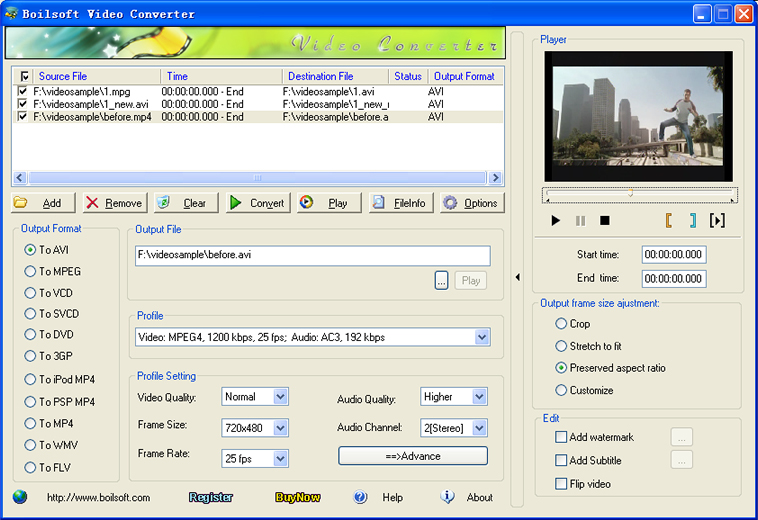
View Full Screenshot
Description: Boilsoft Video Converter is a full-featured video converter program which can convert almost all video and high definition videos to AVI, MPEG, VCD, SVCD, DVD, 3GP, iPod Mp4, PSP MP4, MP4, .flv flash, WMV, and etc. The converted files can be enjoyed on your iPad, iPod touch, iPhone 4S, iPhone 4, Apple TV, Android Tablets, PSP, PS3, Wii, Zune, Sony Walkman, Windows Phone, BlackBerry, etc.
This awesome video converter also enables users to edit output videos to add your desired video effect. You can trim converted video clips, flip video, crop video frame size, add watermark and subtitle and select audio track.
Features of Boilsoft Video Converter:
1. Convert all popular video formats including AVI, MPEG, RM, MP4, WMV, FLV, DivX, XviD, 3GP, MOV, RM, RMVB, MPEG, VOB, DVD, SWF, HD videos(TS, MTS, M2TS, TRP, TP), MPG, etc.
2. Convert any videos to popular video format, like AVI, MPEG, VCD, SVCD, DVD, 3GP, iPod Mp4, PSP MP4, MP4, .flv flash, WMV, and etc.
3. Converted videos can playback on iPhone 4S, iPhone 4, iPhone 3G, iPad, iPod Touch, Zune, Android tablets, Sony PSP, Amazon Kindle, smartphones, portable media players, etc.
4. Set the video audio encoder, frame rate, sample rate, bitrate, aspect ratio, audio channel to personalize output file
5. Rip multiple videos in batch at a time.
6. Clip and converter video segment exactly what you want by setting start point and end point.
7. Add watermark to make your video in the form of a text or image and select the audio track and subtitle according to need.
8. Crop output video frame to remove the unwanted playing areas and the black edges to fit your player s screen.
9. Adjust output frame size any way you want-Stretch to fit screen , Preserve original aspect ratio and Customize as you like.
10. Flip output video to create special effects for your home videos.
Requirements:
* Microsoft DirectX 8.1 or later runtime
* Microsoft Windows 98 ME 2000 XP 2003 Windows Vista Windows 7

 We have affiliation with number one software market place Share-IT\. Contact us for better pricing/customised coupon code
 Use Avangate Coupoun code 548AAC3EB7 to get maximum discount. Please contact through skype: softrevu or send mail to submit@softrevu.com for better pricing
EULA

Tags: Video Converter Convert video AVI to MPEG Converter AVI converter MPEG converter Convert Video
Is this software spam? Report Spam
Software removal request by publisher Removal Request
Software Review: Boilsoft Video Converter Review
For publisher: Request Software Confirmation
Software from the publisher:Boilsoft Audio Converter, Boilsoft Video Joiner for Mac, Boilsoft Video Converter, Boilsoft MTS Converter, Boilsoft AVCHD Converter, Boilsoft IPOD Video Converter, Boilsoft Video Splitter for Mac,
 Free YouTube Downloader Converter


