Software Name:
Image Date Time File name Stamp
Version: 2.0.0
Category: Miscellaneous
Date Listed/Updated: 2020-05-05 18:13:56
File size: 4269 KB
OS: WinXP,WinVista,WinVista x64,Win7 x32,Win7 x64,Windows Vista Ultimate,Windows Vista Ultimate x64,Windows Vista Starter,Windows Vista Home Basic,Windows Vista Home Premium,Windows Vista Business,Windows Vista Enterprise,Windows Vista Home Basic x64,Windows Vista Home Premium x64,Windows Vista Business x64,Windows Vista Enterprise x64,Windows 10,Windows 8
License: Other Price($): 9.49
Author/Publisher name: K Aljundi
View Full Screenshot
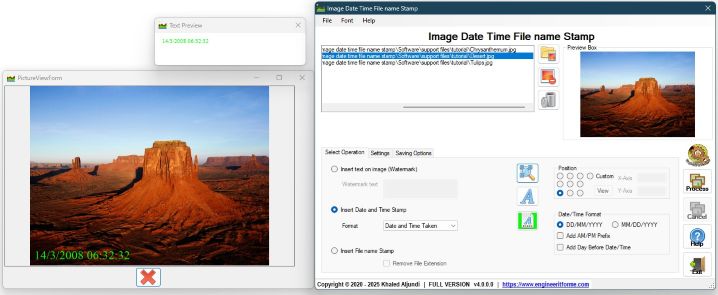
Description: watermark your photos and images using a text that you can provide. The software can also stamp your pictures with any date or time, or extract time and date a photo was taken, also system time and date a photo was created, stamp photo file name extracted from each image. Software supports batch mode operation this allows you to process several images in one go and save time, there is so the ability to compress images during operation. Below is a lost of all features:
1.Simple and very easy to use, just drag and drop images or photos into to the software list box, select a location to save produced images and operation mode and you are ready to go.
2.Watermark images and photos with your own text.
3.Stamp images and photos with Time and Date, various setting combinations available: date and time created, data and time taken, date and time now, time and date created, time and date taken, time and date now, date created, date taken, date now, time create, time taken and time now.
4.Stamp images with image file name. This feature uses the image system file name to stamp your image. So whatever your image is called it will stamp it with its name.
5.Choose between American date format MM DD YYYY or Standard format DD MM YYYY
6.Ability to resize images.
7.Ability to compress photos to reduce their size and save space on your desk.
8.Process one image or a batch of images in one go.
9.Change font size and colour for any stamp or text.
10.Support the following file formats ( .jpg , .jpeg , .bmp , .png , .tif )

 We have affiliation with number one software market place Share-IT\. Contact us for better pricing/customised coupon code
 Use Avangate Coupoun code 548AAC3EB7 to get maximum discount. Please contact through skype: softrevu or send mail to submit@softrevu.com for better pricing
EULA

Tags: image watermark stamp date time on photo stamp file name on photo photo watermark date time stam
Is this software spam? Report Spam
Software removal request by publisher Removal Request
Software Review: Image Date Time File name Stamp Review
For publisher: Request Software Confirmation
Press release from the publisher:watermark your photos and images using a text that you can provide. The software can also stamp your pictures with any date or time, or extract time and date a photo was taken, also system time and date a photo was created, stamp photo file name extracted from each image. Software supports batch mode operation this allows you to process several images in one go and save time, there is so the ability to compress images during operation.
Below is a lost of all features:
1.Simple and very easy to use, just drag and drop images or photos into to the software list box, select a location to save produced images and operation mode and you are ready to go.
2.Watermark images and photos with your own text.
3.Stamp images and photos with Time and Date, various setting combinations available: date and time created, data and time taken, date and time now, time and date created, time and date taken, time and date now, date created, date taken, date now, time create, time taken and time now.
4.Stamp images with image file name. This feature uses the image system file name to stamp your image. So whatever your image is called it will stamp it with its name.
5.Choose between American date format MM DD YYYY or Standard format DD MM YYYY
6.Ability to resize images.
7.Ability to compress photos to reduce their size and save space on your desk.
8.Process one image or a batch of images in one go.
9.Change font size and colour for any stamp or text.
10.Support the following file formats ( .jpg , .jpeg , .bmp , .png , .tif )
Download a demo from http: www.engineeritforme.com software Imagestampdemo.exe
Visit the Press Release for more details
Software from the publisher:Image Date Time File name Stamp,
 Free YouTube Downloader Converter


