Software Name:
UkeySoft CD DVD Encryption
Version: 7.2.0
Category: Miscellaneous
Date Listed/Updated: 2022-12-30 12:39:56
File size: 5766 KB
OS: Win2000,WinXP,Win7 x32,Win7 x64,Windows 8,Windows 10,WinServer,WinOther,Windows2000,Windows2003,Windows Server 2000,Windows Server 2003,Windows Server 2008,Windows Server 2008r2,Windows Server 2012,Windows Tablet PC Edition 2005,Windows Media Center Edition 2005,WinVista,Windows Vista Starter,Windows Vista Home Basic,Windows Vista Home Premium,Windows Vista Business,Windows Vista Enterprise,Windows Vista Ultimate,WinVista x64,Windows Vista Home Basic x64,Windows Vista Home Premium x64,Windows Vi
License: Other Price($): 49.95
Author/Publisher name: Jeam Steven
View Full Screenshot
Description: Do you want to make password-protected encrypted cd dvd discs from your burning software? Need a CD DVD Encryption software to make password-protected data on your CD DVD disc? To solve these problem, what you need is a professional CD DVD Encryption software.
With UkeySoft CD DVD Encryption, you can burn CD or DVD discs with password-protection, it supports most of the burning program, if you have a recorder and a burning software, and you want to burn an encrypted disc, the UkeySoft CD DVD Encryption is you best choice.
UkeySoft CD DVD Encryption is a free DVD or CD copy protection software for creating encrypted data files, virtual discs and burning encrypted CD DVD. It can create a safe area and public area in one disc concurrently. Using Military Standard of 256-bit AES on-the-fly encryption algorithm. The idoo CD DVD Encryption package is designed to be used to backup important data.
This DVD encryption software would protect your important file and folder by encrypting the secure area, which could be only opened by your password, while the public area need not any. Powerful functions with easy operations, UkeySoft CD DVD Encryption helps users to prevent the information in CD DVD from leakage safely. The following guide explains how to encrypt data on a DVD disc.
How to Burn Files to DVD disc with Password Protection
Step 1. Please insert a blank or erasable DVD disc into your computer.
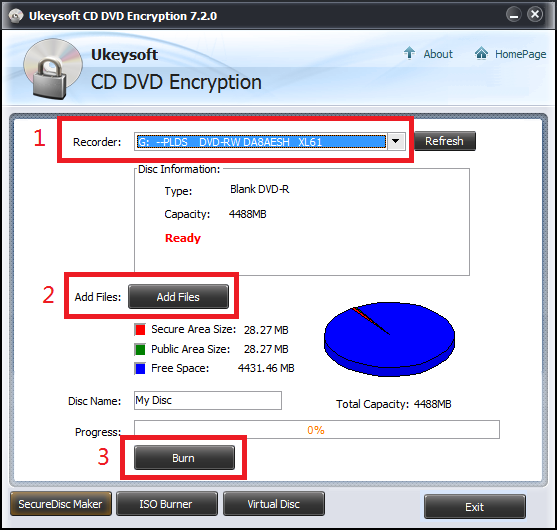
Step 2. Launching the UkeySoft CD DVD Encryption and select Recorder form device list.
Step 3. Click Add Files to open Add file dialogue, then you can add files into secure area or public area.
Step 4. Click Burn button to set Password and start burning the imported files folders to your DVD disc. Only few minutes, your burned DVD disc is encrypted.
Tips: If you want to access the data on it, you need to enter the correct password.

 We have affiliation with number one software market place Share-IT\. Contact us for better pricing/customised coupon code
 Use Avangate Coupoun code 548AAC3EB7 to get maximum discount. Please contact through skype: softrevu or send mail to submit@softrevu.com for better pricing
EULA

Tags: cd dvd encryption burn encryption protect cd dvd encrypt cd dvd password protect cd dvd burn encr
Is this software spam? Report Spam
Software removal request by publisher Removal Request
Software Review: UkeySoft CD DVD Encryption Review
For publisher: Request Software Confirmation
Software from the publisher:UkeySoft Apple Music Converter, UkeySoft Spotify Music Converter, UkeySoft M4V Converter, UkeySoft File Lock, UkeySoft File Lock for Mac, UkeySoft USB Encryption, UkeySoft CD DVD Encryption, UkeySoft Video Converter, UkeySoft Apple Music Converter for Mac, UkeySoft Video Converter for Mac, UkeySoft FoneEraser for Mac, UkeySoft Unlocker for Mac, UkeySoft FoneFix, UkeySoft FoneFix for Mac,
 Free YouTube Downloader Converter


