Software Name:
Start Menu X
Version: 7.33
Category: Miscellaneous
Date Listed/Updated: 2023-01-11 11:06:15
File size: 14389 KB
OS: Win2000,WinXP,Win7 x32,Win7 x64,Windows 8,Windows 10,WinServer,WinOther,WinVista,WinVista x64
License: freeware Price($): 0
Author/Publisher name: Denis Nazarenko
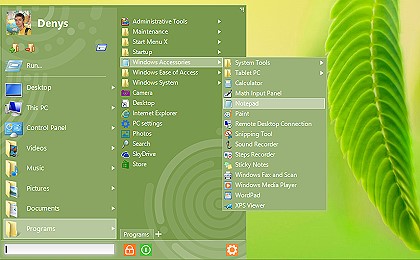
View Full Screenshot
Description: Start Menu X is a replacement of the system menu for professionals. Power users are a lot more demanding, and it s not surprising - instead of a petty dozen of programs we have hundreds! This means that we need a solution developed by professionals for professionals. Find out how to find and launch programs without scrolling, extra clicks and moves - this is Start Menu X. Get it now - virtual groups, one-click program launches, turn off timer.
- Group programs by purpose (office applications, graphics, etc) without changing their location on the hard drive.
- The PRO version allows you to assign a primary program to any folder and start it simply by clicking this folder.
- Customize the menu to your taste! Change the structure and add tabs.
- Start Menu X is an embodiment of our 7-year experience in developing alternative menu solutions.

 We have affiliation with number one software market place Share-IT\. Contact us for better pricing/customised coupon code
 Use Avangate Coupoun code 548AAC3EB7 to get maximum discount. Please contact through skype: softrevu or send mail to submit@softrevu.com for better pricing
EULA

Tags: Start Menu Alternative start Menu PRO start Menu X Start Menu Windows 8 windows 7
Is this software spam? Report Spam
Software removal request by publisher Removal Request
Software Review: Start Menu X Review
For publisher: Request Software Confirmation
Press release from the publisher:OrdinarSoft has released a new 6.5 version of Start Menu X. The new version allows you to adjust the start menu more flexibly and add virtual groups there. The new functionality adds endless customization, as the user is now independent of the physical location of the files.
If you have a long list of programs, it is very convenient to divide them by type. For example, Utilities can go in the ?Utilities? folder and ?Office? applications in the Office folder.
A serious drawback of this approach it?s a necessity to clean up the start menu after every install.
Instead, the Start Menu X offers you the solution a Virtual Groups.
With virtual groups, you can group the files by purpose in Virtual Groups. In other words, the location of the files does not change. Start Menu X store virtual groups in own database. To edit the group, just right-click over any files list and select ?Start Menu X?- ?Manage Virtual groups?. You can create a Virtual group for any folder not only for applications.
With Start Menu X you can create Virtual Groups and add them into the main menu. This allows you to setup the start menu in Windows 10 whatever you like. Right-click over the main menu item that already has virtual groups and selects ?Add items into menu? and after ?Virtual groups? and select corresponding group. Since you can create the Virtual Group for any folder your possibilities are unlimited. Also, you can assign Virtual groups for tabs. Developers provide the video tutorial for new features -
https: www.youtube.com watch?v=pB4B4-NZ-2I&
Start Menu X enhances the functionality of the Start Menu and lets you find and launch applications quickly and easily, even on computers with hundreds of programs installed.
The free version of Start Menu X installs a Start Menu in Windows. The freeware version lets users move their favorite programs into predefined categories so they can be located and launched more quickly. The Pro version costs $9.99(US) for a single-user license, and allows users to add and change virtual group categories, launch programs with a single click, sort the files within groups, and of course restore a Start Menu to Windows 10.
http: www.startmenux.com
Visit the Press Release for more details
Software from the publisher:Cinematheca, Hotkey Search Tool, Vista Start Menu, Start Menu 10, Start Menu X Christmas theme, Start Menu X,
 Free YouTube Downloader Converter


