Software Name:
RecMaster
Version: 2.2.994.243
Category: Miscellaneous
Date Listed/Updated: 2023-01-19 00:12:21
File size: 43802 KB
OS: Win2000,WinXP,Win7 x32,Win7 x64,Windows 8,Windows 10,WinServer,WinOther,Windows2000,Windows2003,Windows Server 2000,Windows Server 2003,Windows Server 2008,Windows Server 2008r2,Windows Server 2012,Windows Tablet PC Edition 2005,Windows Media Center Edition 2005,WinVista,Windows Vista Starter,Windows Vista Home Basic,Windows Vista Home Premium,Windows Vista Business,Windows Vista Enterprise,Windows Vista Ultimate,WinVista x64,Windows Vista Home Basic x64,Windows Vista Home Premium x64,Windows Vi
License: Other Price($): 29.95
Author/Publisher name: RecMaster RecMaster
View Full Screenshot
Description: RecMaster is a super-easy and professional screen recording software. It supports accurate screen recording of desktop activities such as games, presentations, live webcasts, online lectures, and business meeting videos.
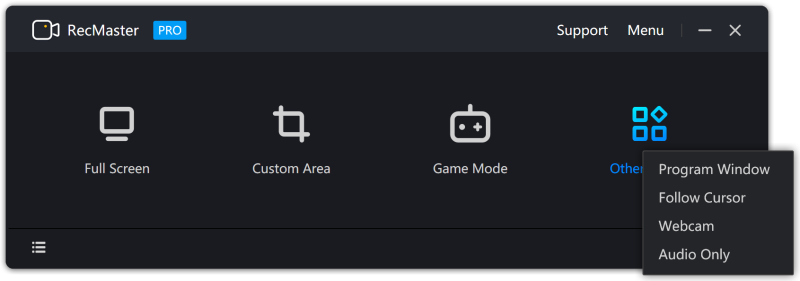
You can record full-screen, custom area, game, and any program window according to your needs within one click. And the software also supports recording with the computer camera or webcam and recording audio-only files. It allows you to complete the recording quickly, efficiently, and stably in different recording environments. The simple built-in editor helps edit the recorded files by cutting, merging, subtitle adding, delogo, etc. With this screen recorder, you can set recording format, resolution, frame rate, camera output, audio output, etc., separately to record all kinds of video content you want. It is the best choice for your work, study, and entertainment.
One-click Made Screen Recording Simple
Built with seven screen recording modes, RecMaster offers you the easiest and most efficient way to record your computer screen.
4K and HD Recording with Helpful Features
RecMaster comes with powerful features, like 4K & HD recording, picture in picture, scheduled and automatic recording, etc., offering the best experience for screen video recording.
Edit Recorded Clips Easily
Built with editing tools, RecMaster allows you to edit your video by merging, cutting, subtitle adding, delogo, or adding a custom watermark. Make sure your recording video will be perfect and instructive to your viewer.
Showing Effects for Cursor & Keystrokes
You can choose different movement effects or colors for the cursor. You can also set a click sound or different colors for the right and left-click. Thus, it offers your viewer a more effective guideline. Keystrokes can also be shown as you like.
Hotkeys Settings for More Convenient Experience
Start stop recording, show hide webcam, enable disable boss key to record in background, etc., with hotkeys.

 We have affiliation with number one software market place Share-IT\. Contact us for better pricing/customised coupon code
 Use Avangate Coupoun code 548AAC3EB7 to get maximum discount. Please contact through skype: softrevu or send mail to submit@softrevu.com for better pricing
EULA

Tags: RecMaster screen recorder screen recorder windows screen caputre screen recording software screen
Is this software spam? Report Spam
Software removal request by publisher Removal Request
Software Review: RecMaster Review
For publisher: Request Software Confirmation
Press release from the publisher:RecMaster V2.2 Released with New and Enhanced Features
CHICAGO, March 1, 2022 - RecMaster, the super-easy and powerful screen recorder that found extensive use in several fields was updated to V2.2. Suitable for both novice and professional users, the super-easy screen recorder helped tons of users to create screen recordings for gaming, study, teaching, entertainment, or business purposes. RecMaster V2.2 was released with new and improved features bringing a much easier and more convenient screen recording experience.
Download
https: www.recmaster.net channel?channel=c83f066e
What s New in RecMaster V2.2?
* Improved Auto Recording Feature
There are 3 options in the newly added Auto recording settings: Segment, Auto-record, and Schedule.
Segment: Automatically save the video file in segments according to the set duration or size.
Auto-record: Set to Auto-record in full screen upon the screen recorder launch and decide whether to hide the recording in the background, and set to end an auto or manually started recording at the set duration and file size
Schedule: The Task Scheduler is enhanced and one can not only schedule a task with starting and ending time, but also set whether to repeat the scheduled task.
* Show the Keystroke in Real-time on the Screen
The newly added Keyboard settings help to show up the keystrokes and mouse clicks on the recording screen.
* Hide the System Taskbar and Status Bar
Hope to record the entire screen without showing up the system taskbar? Just tick to hide the System taskbar in Advanced Settings.
* Magnifier Helps to Find Details
The newly added magnifier tool helps enlarge the pointed sections on the screen.
* Flexible Webcam Recording
In this update, this video capturing software provides round webcam display, and can be changed on the webcam window in Full-Screen mode and Custom Area mode.
* Add the Automatic Gain of Mic System Sound
The newly added mic System sound gain, and enhanced mic noise reduction helps to get clearer audio.
Price & Availability
Free: The Free Trial version can be used to evaluate the features with some limitations.
Difference between Free & Pro versions: https: www.recmaster.net user-guide membership-benefits
1 Year 1 PC License: $19.95
Lifetime 2 PCs License: $29.95
Purchase link: https: www.recmaster.net buy recmaster
About RecMaster
RecMaster Studio is a team with ambitions and passion born in Aunbox Software Co., Ltd. and helped tons of gamers, teachers, students, office workers & managers, and IT staff to create video & audio contents they want. More updates are on the way.
Visit the Press Release for more details
Software from the publisher:RecMaster, RecMaster Screen Recorder for Mac,
 Free YouTube Downloader Converter


