Software Name:
Canvas X Draw
Version: 7
Category: Miscellaneous
Date Listed/Updated: 2023-02-16 05:24:02
File size: 222154 KB
OS: Mac OS X,
License: Other Price($): 99
Author/Publisher name: Canvas sales
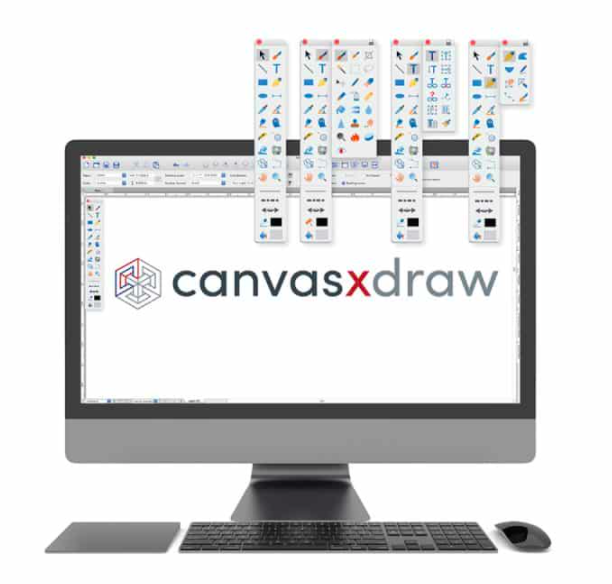
View Full Screenshot
Description: Drawing with Precision
Canvas X Draw comes loaded with tools and techniques that allow you to easily create scale drawings, floor plans, architectural designs, and other technical drawings with measured precision and placement. Snap objects into exact positions relative to each other, draw from the center points of objects, define the scale for scale drawings, systematically align objects, display size information as you work, and add dimension objects.
Work with Vector and Raster Images
Canvas X Draw s unique and integrated design environment makes it possible to work with and combine all graphical elements and apply high end effects to each in a single document. Thanks to the ability to work with both vector graphics and raster images with the same powerful enhancement tools, Canvas X users are able to create professional-looking outputs while preserving complete editing control of all graphical data.
Add Objects on the Fly
Canvas X Draw comes stocked with a diverse range of commonly used and specialized technical symbols. Or you can create your own from any vector, text, composite, or paint object, and add it to the Symbol Library. And if you alter a symbol in the palette, all copies of it in the document will change along with it, allowing you to maximize efficiency.
Vector Object Versatility
Experience complete flexibility while working dynamically with vector objects. Canvas Xs adaptable Sprite technology can be used to apply image and transparency effects without rendering, allowing you to continue to edit your graphics at any time. Do more with specialized technologies, such as gradient transparency tools, vector masks, opacity effects, channel masks, and much more.
Raise the Bar with Raster Images
Design, edit, and upgrade raster images with a variety of industry-leading tools and filters. Form composites, touch up photos, create and utilize transparency effects, paint, clone pixels, and more.

 We have affiliation with number one software market place Share-IT\. Contact us for better pricing/customised coupon code
 Use Avangate Coupoun code 548AAC3EB7 to get maximum discount. Please contact through skype: softrevu or send mail to submit@softrevu.com for better pricing
EULA

Tags: drawing program for mac graphic design software for mac technical drawing for mac mac drawing sof
Is this software spam? Report Spam
Software removal request by publisher Removal Request
Software Review: Canvas X Draw Review
For publisher: Request Software Confirmation
Press release from the publisher:Canvas GFX, Inc. releases the latest edition of the graphics software, Canvas Draw 6 for macOS. Canvas Draw 6 is stacked with an array of vector and raster image editing tools, built-in templates, and over 2000 symbols. Built with business professionals and creatives in mind, Canvas Draw 6 proves to be a diverse content creation tool with the power to generate projects, from precise technical drawings to metrics, from architectural design to logo design.
New Features
* Visual Combine tool, which allows you to visually and intuitively combine the common areas of overlapping vector objects to create complex shapes.
* Vector Brush tool, which allows you to draw vector curve paths with strokes with tapered ends.
* Mirror tool, which will make a reverse copy of selected objects in 2 clicks. The mirror axis can be drawn or snapped to other objects and rotated freely.
* Annotation Notes, which now supports auto-numbering and auto-alphabetizing. EasyShapes like circles, squares, rounded squares, or diamond shapes can be used for annotations.
* Ink Stroke Selection tool, which allows you to select an object with specific attributes and every object sharing those attributes will also be selected.
* Page Navigator palette, which displays thumbnail previews of the pages in your document. Using the Page Navigator palette, you can quickly find and go to a particular page.
* Object Path Editor palette (Path?|?Object Path Editor), allows you to view and edit the X Y coordinates of each individual point of a basic vector object, polygon, or B?zier curve.
* Replicate and Position (Edit?|?Replicate and Position), which replicates objects and then strategically positions them according to specified X Y coordinates.
* Fractalize (Effects?|?Fractalize), which makes outlines of vector objects irregularly jagged.
* Colorize (Effects?|?Colorize), which allows you to tint vector objects with a solid color fill or pen inks when you want to mix two colors, or shade one color with another.
* Dark mode support with updated icons in the Toolbox, Toolbar, and other areas.
Learn more: https: www.canvasgfx.com products canvas-x-draw
Get a free unrestricted trial: https: www.canvasgfx.com canvas-x draw-operating-system-trial
Visit the Press Release for more details
Software from the publisher:Canvas X Draw,
 Free YouTube Downloader Converter


