Software Name:
Disk Password Protection
Version: 5.5.1
Category: Utilities
Date Listed/Updated: 2023-03-30 23:56:16
File size: 10830 KB
OS: Win98,WinME,WinNT 4.x,WinXP,Windows2000,Windows2003,Windows Vista Starter,Windows Vista Home Basic,W
License: Other Price($): 49
Author/Publisher name: Vasil Mikulich
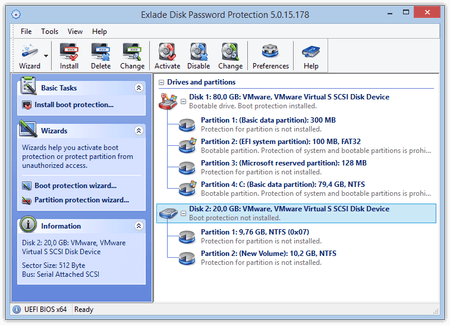
View Full Screenshot
Description: A utility providing comprehensive professional protection of the operating system load and hard disk contents against unauthorized access by setting a unique password.
Restricting access to a specific disk, partition, and removable drive (USB drive, flash drive, memory card, etc.) hides it from the system device list. Not only is the password used to access the contents of a disk, but it is also required to identify it.
The utility also allows you to set a unique password to protect any operating system load from any disk. Your passwords are securely encrypted and stored in the read-protected segments of the disk.
Because the Disk Password Protection 5.5.1 system provides data access restriction at the low, hardware level, the protection mechanisms start working with the disk directly even before the operating system and any third party software are launched. This protection logic and the innovative technology of accessing disk partitions provide stronger protection and help avoid the potential interference of unauthorized software in the protection algorithms of the utility.
Disk Password Protection 5.5.1 is perfectly optimized to work with Windows 8 or higher and can be used to control load protection in BIOS and with UEFI. In addition to MBR disks support, the utility has the feature of protection of the disk and partition load on GPT devices. Support for both basic and dynamic disks is also included.
Another important advantage is that uninstalling the utility will not automatically remove the protection. Even after the OS is deleted, all of the protected partitions and disks will remain protected until you disable the password protection, and that is impossible to do in any other way other than with the Disk Password Protection 5.5.1 utility tools and respective passwords.

 We have affiliation with number one software market place Share-IT\. Contact us for better pricing/customised coupon code
 Use Avangate Coupoun code 548AAC3EB7 to get maximum discount. Please contact through skype: softrevu or send mail to submit@softrevu.com for better pricing
EULA

Tags: disk encryption volume encryption boot password hdd volume partition crypto disk lock OS os lock sys
Is this software spam? Report Spam
Software removal request by publisher Removal Request
Software Review: Disk Password Protection Review
For publisher: Request Software Confirmation
Software from the publisher:Disk Password Protection,
 Free YouTube Downloader Converter


