Software Name:
Boxoft Screen Tutorial Creator
Version: 1.3
Category: Miscellaneous
Date Listed/Updated: 2022-07-29 17:46:27
File size: 3900 KB
OS: WinXP,WinVista,WinVista x64,Win7 x32,Win7 x64,Win2000,Windows2000,Windows2003,Windows Vista Ultimate,Windows Vista Ultimate x64,Win98,WinME,WinNT 3.x,WinNT 4.x,Win95,Windows Vista Starter,Windows Vista Home Basic,Windows Vista Home Premium,Windows Vista Business,Windows Vista Enterprise,Windows Vista Home Basic x64,Windows Vista Home Premium x64,Windows Vista Business x64,Windows Vista Enterprise x64
License: Other Price($): 39
Author/Publisher name: Alice Li
View Full Screenshot
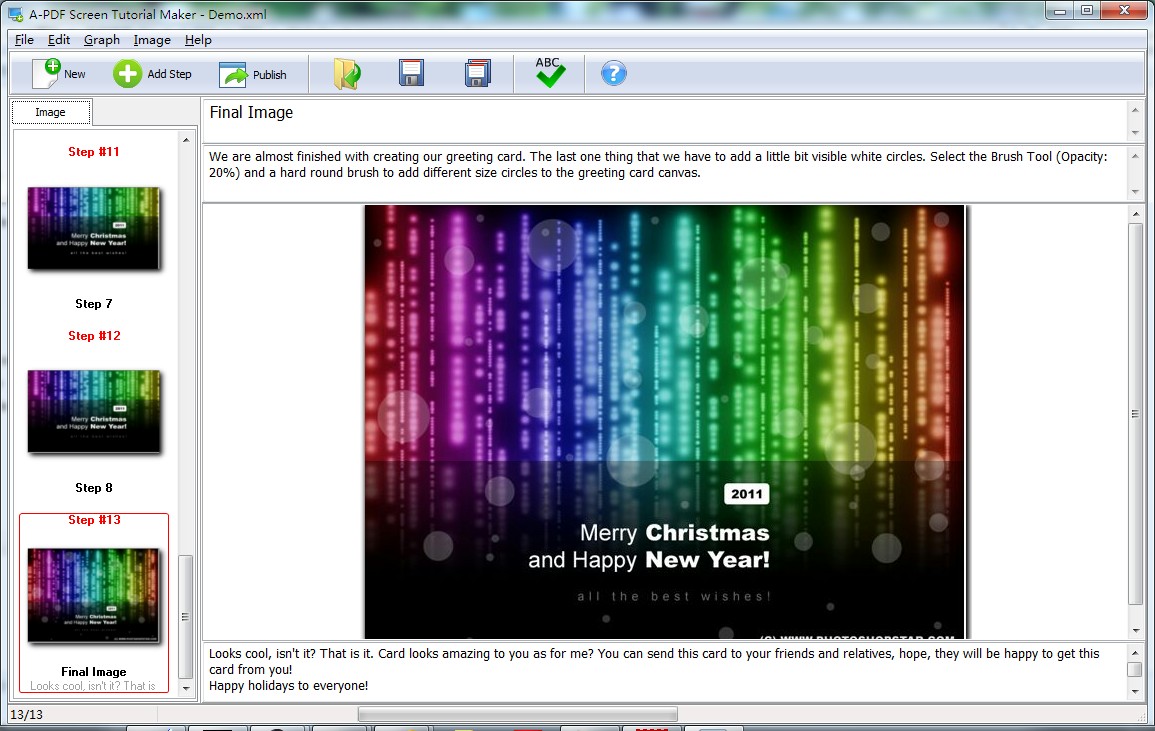
Description: Boxoft Screen Tutorial Creator is powerful but easy-to-use software to create live and clear tutorial from screenshot with ease. The friendly user interface guides you operation details in a clear way. You can make a complete tutorial just by capturing screen, inputting instructed text, and then publishing with wanted format (PDF, Word, Html). No more professional tutorial editing skills needed.
The complete set of A-PDF Screen Tutorial Maker features include
Simple, Fast, Effective: You will create visual documents in less time with less effort. A-PDF Screen Tutorial Maker will help you communicate more clearly, saving you time in all aspects of your business. Guaranteed.
All the Power, None of the Hassle: A-PDF Screen Tutorial Maker is so simple to use you will be up and running in under 5 minutes. A-PDF Screen Tutorial Maker removes all of the hassle associated with working with screenshots inside of documents. A-PDF Screen Tutorial Maker makes what is a time consuming and tedious process fun.
Powerful Export Options: A-PDF Screen Tutorial Maker makes sharing your content easy. Export formats include HTML, PDF, MS Word Apple Pages, blogs, wikis and content management systems and emails.

 We have affiliation with number one software market place Share-IT\. Contact us for better pricing/customised coupon code
 Use Avangate Coupoun code 548AAC3EB7 to get maximum discount. Please contact through skype: softrevu or send mail to submit@softrevu.com for better pricing
EULA

Tags: Tutorial creator Tutorial maker Tutorial builder software Tutorial documentation Screenstep blo
Is this software spam? Report Spam
Software removal request by publisher Removal Request
Software Review: Boxoft Screen Tutorial Creator Review
For publisher: Request Software Confirmation
Press release from the publisher:Boxoft Screen Tutorial Creator is powerful but easy-to-use software to create live and clear tutorial from screenshot with ease. The friendly user interface guides you operation details in a clear way. You can make a complete tutorial just by capturing screen, inputting instructed text, and then publishing with wanted format (PDF, Word, Html). No more professional tutorial editing skills needed.
Why Boxoft Screen Tutorial Creator
Do you want to show your computer screen to someone else and tell how to run some useful or interesting software? Are you bothering on how to create a perfect tutorial with pictures and accompanying essay combined excellently? How to show your instructions in an easy but clear way?
Boxoft Screen Tutorial Creator is flexible enough with multiple different tools or options provided. You can make tutorial with screenshot, window screen even existing images; edit image in multiple ways, such as input text, draw lines, arrows, rectangles, etc.; publish in various formats, like PDF, HTML, Word, Email or Image.
The complete set of Boxoft Screen Tutorial Creator features include
Simple, Fast, Effective: You will create visual documents in less time with less effort. A-PDF Screen Tutorial Maker will help you communicate more clearly, saving you time in all aspects of your business. Guaranteed.
All the Power, None of the Hassle: Boxoft Screen Tutorial Creator is so simple to use you will be up and running in under 5 minutes. Boxoft Screen Tutorial Creator removes all of the hassle associated with working with screenshots inside of documents. Boxoft Screen Tutorial Creator makes what is a time consuming and tedious process fun.
Powerful Export Options: Boxoft Screen Tutorial Creator makes sharing your content easy. Export formats include HTML, PDF, MS Word Apple Pages, blogs, wikis and content management systems and emails.
Visit the Press Release for more details
Software from the publisher:Boxoft All to Amr Converter, Boxoft Screen Tutorial Creator, Boxoft Flash SlideShow Creator, Boxoft Easy Backup, Boxoft Scan To PDF, Boxoft Auto Copy, Boxoft Convert Master, Boxoft Free OCR (freeware), Boxoft PDF to Word, Boxoft PowerPoint to Flash, Boxoft JavaScript SlideShow Builder, Boxoft Flash Zoom Magic, Boxoft Flash Zoom Maker, Boxoft PDF to Flipbook, Boxoft Photo SlideShow Builder, Boxoft PDF to Video, Boxoft PDF to DOC Converter, Boxoft Screen OCR, Boxoft Video To Flash, Boxoft TIFF Merge and Split, Boxoft Video To GIF,
 Free YouTube Downloader Converter


