Software Name:
Boxoft PDF to DOC Converter
Version: 2.0
Category: Miscellaneous
Date Listed/Updated: 2022-08-14 01:26:03
File size: 5705 KB
OS: WinXP,WinVista,WinVista x64,Win7 x32,Win7 x64,Win2000,Windows2000,Windows2003,Windows Vista Ultimate,Windows Vista Ultimate x64,Win98,WinME,WinNT 3.x,WinNT 4.x,Win95,Windows Vista Starter,Windows Vista Home Basic,Windows Vista Home Premium,Windows Vista Business,Windows Vista Enterprise,Windows Vista Home Basic x64,Windows Vista Home Premium x64,Windows Vista Business x64,Windows Vista Enterprise x64
License: Other Price($): 27
Author/Publisher name: Alice Li
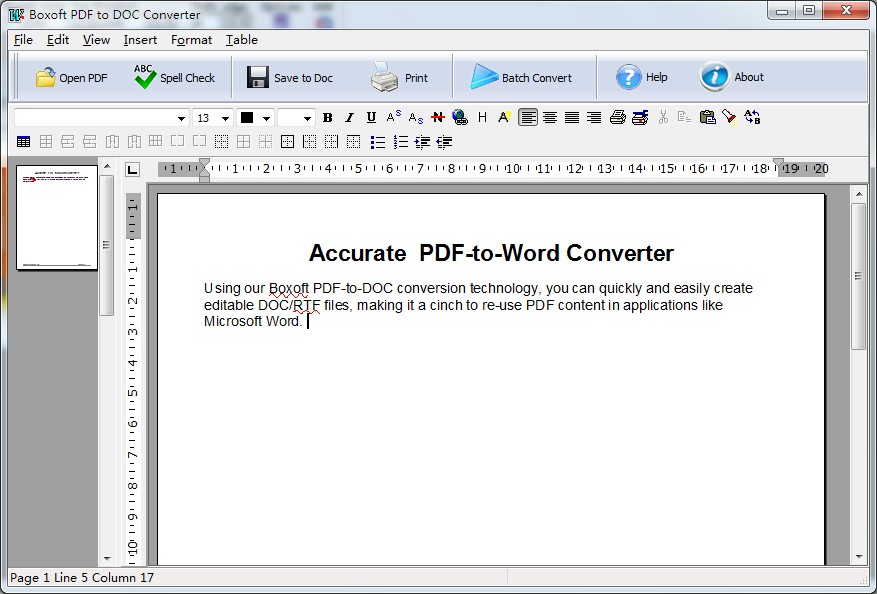
View Full Screenshot
Description: Boxoft PDF to Word is a desktop application that quickly and accurately convert PDF files into editable MS Word Documents, it can convert pdf to doc with complete adherence to layout, retaining images and all formatting. The application retains 100% original formatting and makes editing of PDF files easy.
Feature
Retain 100% Format
Boxoft PDF to Word is synonymous with excellent and top-notch document conversion software. Its advanced features ensure that the converted document is exactly like the original.
Edit your PDF Files
Very often, you need to edit your PDF documents. Boxoft PDF to Word allows you to be in charge of your document. Editing your converted document is absolutely easy. This document converter also converts your document to .rtf format besides .doc format.
Standalone, don t require Microsoft Word and Adobe Acrobat
Support encrypted PDF files conversion
Preserve text, layouts, images, tables and hyperlinks in an editable Word document
Support Batch conversion of over 100000 PDF files

 We have affiliation with number one software market place Share-IT\. Contact us for better pricing/customised coupon code
 Use Avangate Coupoun code 548AAC3EB7 to get maximum discount. Please contact through skype: softrevu or send mail to submit@softrevu.com for better pricing
EULA

Tags: pdf to word convert pdf to docx pdf to word conversion pdf to rtf pdf conversion tool edit pdf f
Is this software spam? Report Spam
Software removal request by publisher Removal Request
Software Review: Boxoft PDF to DOC Converter Review
For publisher: Request Software Confirmation
Press release from the publisher:Boxoft PDF to Word is a desktop application that quickly and accurately convert PDF files into editable MS Word Documents, it can convert pdf to doc with complete adherence to layout, retaining images and all formatting. The application retains 100% original formatting and makes editing of PDF files easy.
Boxoft PDF to Word can converts your PDFs to Word docs with complete adherence to layout, retaining images and all formatting. The application retains 100% original formatting and makes editing of PDF files easy.
Feature
Retain 100% Format
Boxoft PDF to Word is synonymous with excellent and top-notch document conversion software. Its advanced features ensure that the converted document is exactly like the original.
Edit your PDF Files
Very often, you need to edit your PDF documents. Boxoft PDF to Word allows you to be in charge of your document. Editing your converted document is absolutely easy. This document converter also converts your document to .rtf format besides .doc format.
Standalone, don t require Microsoft Word and Adobe Acrobat
Support encrypted PDF files conversion
Preserve text, layouts, images, tables and hyperlinks in an editable Word document
Support Batch conversion of over 100000 PDF files
Visit the Press Release for more details
Software from the publisher:Boxoft All to Amr Converter, Boxoft Screen Tutorial Creator, Boxoft Flash SlideShow Creator, Boxoft Easy Backup, Boxoft Scan To PDF, Boxoft Auto Copy, Boxoft Convert Master, Boxoft Free OCR (freeware), Boxoft PDF to Word, Boxoft PowerPoint to Flash, Boxoft JavaScript SlideShow Builder, Boxoft Flash Zoom Magic, Boxoft Flash Zoom Maker, Boxoft PDF to Flipbook, Boxoft Photo SlideShow Builder, Boxoft PDF to Video, Boxoft PDF to DOC Converter, Boxoft Screen OCR, Boxoft Video To Flash, Boxoft TIFF Merge and Split, Boxoft Video To GIF,
 Free YouTube Downloader Converter


